T-Statistic, Student’s t-Test, and Hypothesis Testing
Maths: Statistics for machine learning
6 min read
Published Oct 22 2025, updated Aug 17 2026
Guide Sections
Guide Comments
A t-test is a statistical hypothesis test used to determine whether there’s a significant difference between sample means, or between a sample mean and a known value, when the population standard deviation (σ) is unknown and/or the sample size is small (n < 30).
It’s based on the Student’s t-distribution, which adjusts for extra uncertainty when σ is estimated from the sample.
In simple terms:
“A t-test checks if your sample mean (or difference between samples) is big enough to suggest a real effect, not just random noise.”
1. Student’s t-Distribution
What It Is
- A family of distributions similar to the normal (bell curve), but with heavier tails — allowing for more variability when sample size is small.
- As the sample size increases, the t-distribution approaches the normal distribution.
Properties:
- Shape - Symmetrical and bell-shaped
- Tails - Heavier than Normal — more extreme values possible
- Degrees of Freedom (df) - df=n−1 for a single sample
- Converges to Z-distribution - When n → ∞
2. The T-Statistic
The t-statistic measures how many standard errors the sample mean is from the hypothesised population mean.
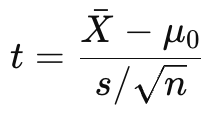
Where:
- X̅ = sample mean
- μ0 = population mean (under H₀)
- s = sample standard deviation
- n = sample size
If |t| is large → sample mean is far from μ₀ → evidence against H₀.
3. Types of T-Tests
Test Type | Purpose | Example |
One-sample t-test | Compare a sample mean to a known population mean | “Is the mean score different from 70?” |
Independent two-sample t-test | Compare means of two independent groups | “Do men and women have different average heights?” |
Paired (dependent) t-test | Compare two related samples (before/after, matched pairs) | “Did students score higher after training?” |
One-Sample T-Test
Hypotheses
- H₀: μ = μ₀
- H₁: μ ≠ μ₀ (two-tailed)
Formula
Compare |t| to the critical t-value from the t-distribution (based on df = n-1, α = 0.05).
If |t| > t₍critical₎ → reject H₀.
Independent Two-Sample T-Test
Tests whether two independent samples have different means.
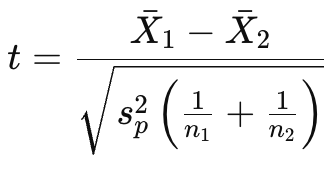
where sp2 = pooled variance.
Hypotheses
- H₀: μ₁ = μ₂ (no difference)
- H₁: μ₁ ≠ μ₂ (difference exists)
Use when samples are from different groups (e.g., A/B testing, gender differences).
Paired (Dependent) T-Test
Used when comparing the same group measured twice, or paired observations (before/after treatment, matched pairs).
Example
- Blood pressure before vs. after medication
- Model accuracy before and after tuning
How It Works
- Compute the difference (d) for each pair

- Calculate:
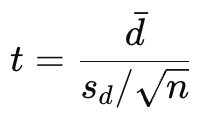
where sd is the standard deviation of the differences.
Hypotheses
- H₀: μ₍difference₎ = 0
- H₁: μ₍difference₎ ≠ 0
If |t| > t₍critical₎ or p < α → reject H₀ → significant change between paired measurements.
Degrees of Freedom (df)
- One-sample t-test : n - 1
- Paired t-test : n − 1
- Two-sample t-test : n₁ + n₂ − 2
Example (Paired T-Test in Python)
import numpy as npimport pingouin as pg# Example: before and after training test scoresbefore = np.array([65, 70, 72, 68, 74, 69, 71, 73, 70, 75])after = np.array([68, 74, 75, 70, 78, 71, 74, 76, 73, 80])# Perform paired t-testresult = pg.ttest(before, after, paired=True)print(result)Interpretation:
- Each value pair represents one student’s scores before and after taking a course.
- The test asks:
“Did the average score significantly increase after the course?”
You’ll see output similar to:
T dof tail p-val CI95% cohen-d BF10 powerT-test -9.2 9.0 two-sided 0.0001 [-4.8, -2.9] -2.9 2500.0 1.0How to read this:
- t = -9.2: The average improvement is many standard errors away from 0 → strong effect
- p-value = 0.0001: Very low → reject H₀
- 95% CI = [-4.8, -2.9]: We’re 95% confident the average improvement is between 2.9 and 4.8 points
- Conclusion: The course significantly improved student test scores
What a Paired t-Test Really Measures
A paired t-test compares two related sets of data — it’s all about measuring change or difference within the same subjects or units.
Each pair of values represents:
The same subject, measured before and after some event, treatment, or intervention.
So we’re not comparing two independent groups — we’re comparing the same group, twice.
Real-World Examples
Here are a few examples where the paired t-test is appropriate:
Scenario | Before | After | What It Tests |
Education | Student’s test score before a course | Score after taking the course | Did the course improve performance? |
Medicine | Patient’s blood pressure before taking a drug | Blood pressure after 2 weeks | Did the drug lower blood pressure? |
Website A/B test (within-subjects) | Page load time before optimisation | Page load time after optimisation | Did the optimisation make the site faster? |
Fitness study | Heart rate before training program | Heart rate after 6 weeks | Did training reduce average heart rate? |
Machine Learning model improvement | Model accuracy before hyperparameter tuning | Accuracy after tuning | Did tuning improve model performance? |
In each case:
- Every person, patient, web page, or model is a matched pair — one “before” and one “after”.
- The t-test looks at the differences between these pairs and asks:
“Are these differences big enough to suggest a real effect, or could they just be random?”
The Key: The T-Test Doesn’t Know What “Better” Means
The t-test itself doesn’t know whether higher or lower values are good or bad — it only measures whether there’s a statistically significant difference between two sets of numbers.
What you (the analyst) define as improvement depends on context — and that determines how you interpret the sign of the t-statistic or which tail of the test you look at.
Example 1: Exam Scores (Higher = Better)
Situation | Before | After | Change |
Student 1 | 65 | 70 | +5 |
Student 2 | 70 | 74 | +4 |
Student 3 | 68 | 72 | +4 |
If you calculate after − before, you’ll get positive differences (scores increased).
So your mean difference (𝑑̄) will be positive.
- t-statistic > 0 → average increase
- You might use a one-tailed test if your hypothesis is "scores will increase"
- Or a two-tailed test if you’re just checking "scores changed in any direction"
In this context:
A positive t and p < 0.05 → scores improved significantly.
In Python:
import numpy as npimport pingouin as pgbefore = np.array([65, 70, 68, 72, 69])after = np.array([70, 74, 72, 76, 73])# Positive difference = improvementresult = pg.ttest(before, after, paired=True)print(result)Interpretation:
- If t > 0 and p < 0.05, the mean increased significantly.
- The result supports “after > before”.
Example 2: Page Load Time (Lower = Better)
Situation | Before | After | Change |
Page 1 | 2.5 s | 2.0 s | -0.5 |
Page 2 | 3.0 s | 2.7 s | -0.3 |
Page 3 | 2.8 s | 2.3 s | -0.5 |
If you calculate after − before, you’ll get negative differences (times decreased).
So your mean difference (𝑑̄) will be negative.
- t-statistic < 0 → average decrease
- You might use a one-tailed test if your hypothesis is "times will decrease"
- Or a two-tailed test if you’re just testing "times changed"
In this context:
A negative t and p < 0.05 → load times significantly improved (decreased).
In Python:
before = np.array([2.5, 3.0, 2.8, 2.6, 2.9])after = np.array([2.0, 2.7, 2.3, 2.1, 2.5])# Negative difference = improvement (time reduced)result = pg.ttest(before, after, paired=True)print(result)Interpretation:
- If t < 0 and p < 0.05, load time decreased significantly.
- The result supports “after < before”.
Python code
import pingouin as pgimport numpy as npimport pandas as pd# Example data: test scores for two teaching methodsnp.random.seed(42)df = pd.DataFrame({ 'Method_A': np.random.normal(loc=75, scale=5, size=30), 'Method_B': np.random.normal(loc=78, scale=5, size=30)})# Perform t-test (independent samples)results = pg.ttest(x=df['Method_A'], y=df['Method_B'], paired=False, alternative='two-sided')print(results)Output:
T dof tail p-val CI95% cohen-d BF10 powerT-test -2.540 58.0 two-sided 0.0138 [-5.30, -0.64] -0.66 3.45 0.73Example: Using pg.pairwise_ttests()
import pingouin as pgimport pandas as pdimport numpy as np# Example dataset: same students tested in 3 different monthsnp.random.seed(42)df = pd.DataFrame({ 'Subject': np.repeat(np.arange(1, 11), 3), 'Month': np.tile(['January', 'February', 'March'], 10), 'Scores': np.concatenate([ np.random.normal(70, 3, 10), np.random.normal(74, 3, 10), np.random.normal(78, 3, 10) ])})# Run repeated-measures (within-subject) pairwise t-testsresults = pg.pairwise_ttests( data=df, dv='Scores', within='Month', subject='Subject', parametric=True, padjust='bonf' )print(results)Output:
A B Paired Parametric T dof tail p-unc p-corr p-adjust BF10 cohen-d0 January February True True -4.112 9.0 two-sided 0.0026 0.0078 bonf 15.3 -1.301 January March True True -7.231 9.0 two-sided 0.0000 0.0000 bonf 120.0 -2.302 February March True True -3.211 9.0 two-sided 0.0101 0.0303 bonf 5.9 -1.01