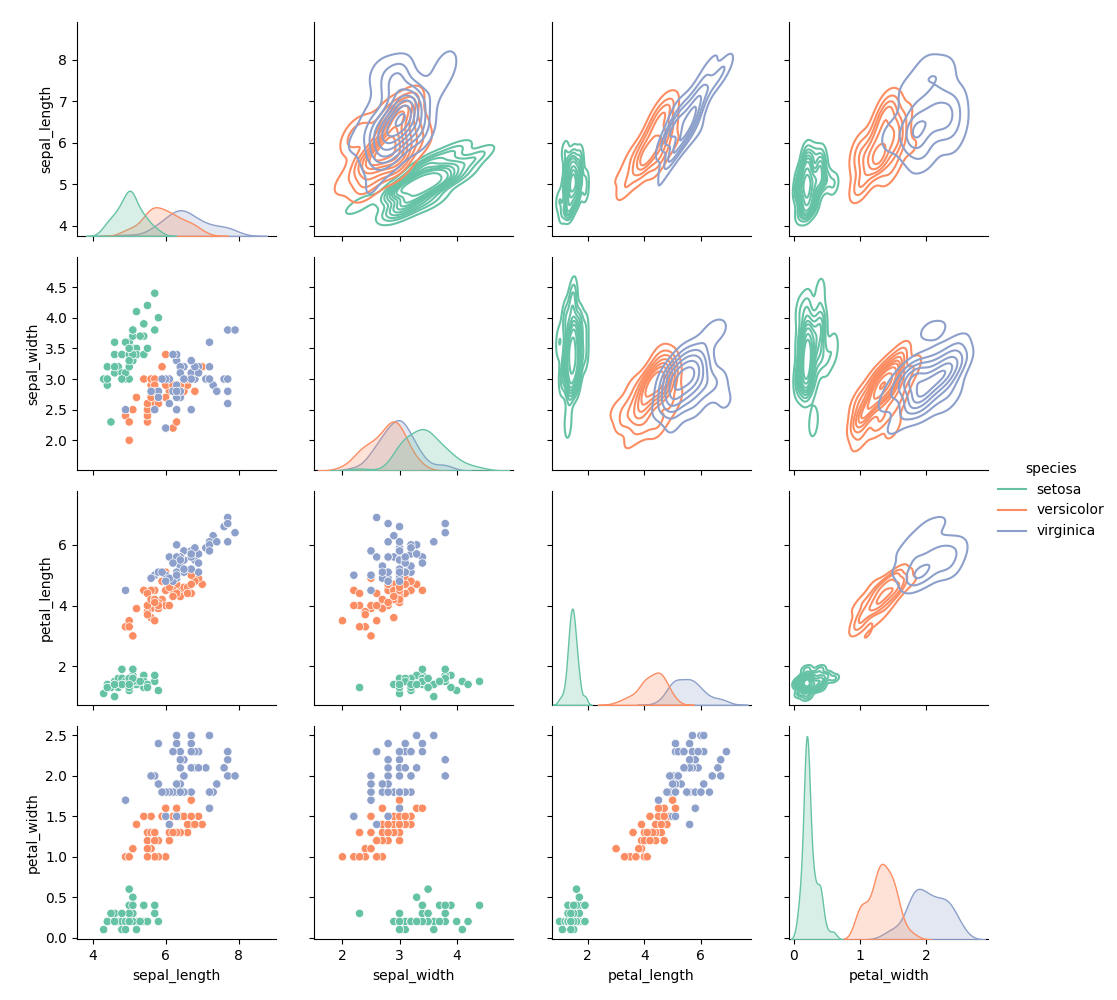
Pair grid
Seaborn basics
1 min read
This section is 1 min read, full guide is 42 min read
Published Oct 7 2025, updated Aug 17 2026
24
Show sections list
0
Log in to enable the "Like" button
0
Guide comments
0
Log in to enable the "Save" button
Respond to this guide
Guide Sections
Guide Comments
ChartsGraphsMatplotlibNumPyPandasPythonSeabornVisualisation
seaborn.PairGrid() creates a matrix of subplots (like pairplot()) to show pairwise relationships between multiple variables.
It’s the lower-level, fully customisable version of sns.pairplot().
You can:
- Control what kind of plot appears in each section (upper, lower, diagonal)
- Add custom plots or transformations
- Mix multiple plot types in one grid
Syntax:
sns.PairGrid( data, *, vars=None, x_vars=None, y_vars=None, hue=None, palette=None, hue_kws=None, corner=False, diag_sharey=True, height=2.5, aspect=1, despine=True, dropna=True,)Parameters:
data= DataFrame containing the datavars= List of variables to include (both x and y)x_vars,y_vars= Separate lists for asymmetric gridshue= Variable for colour groupingpalette= Colour palette for huecorner= If True, show only lower triangleheight= Height (inches) of each subplotaspect= Aspect ratio of each subplotdiag_sharey= Share y-axis across diagonal plotsdespine= Remove spines for cleaner look
Add different plots to diagonal and off-diagonal
import seaborn as snsimport matplotlib.pyplot as pltiris = sns.load_dataset("iris")g = sns.PairGrid(iris, hue="species", palette="Set2")g.map_lower(sns.scatterplot)g.map_diag(sns.kdeplot, fill=True)g.map_upper(sns.kdeplot)g.add_legend()plt.show()- Lower triangle = scatterplots
- Upper triangle = KDE contours
- Diagonal = smoothed KDE of each variable
- Adds legend automatically